Let’s be honest—most KoalaWriter users barely scratch the surface. This AI writing tool packs in a surprising amount of power, but much of it stays tucked away unless you know exactly where to look.

There’s more here than just basic article generation. KoalaWriter brings live SEO analysis, automatic internal linking, and secret chat commands to the table—features that can seriously streamline your workflow.
Ready to dig deeper? Here are five features that most folks miss, but honestly, they can change how you create content. Whether you’re after up-to-the-minute data or want total control over your article outlines, these tools make writing faster and smarter.
Feature 1: Real-Time SEO Optimization

KoalaWriter taps directly into live Google search results to see what’s ranking for your keywords right now. This live SEO analysis runs automatically when you start drafting a blog post.
It scans the top-performing pages and pulls out up to 100 relevant keywords and subtopics. As you write, KoalaWriter nudges you to include elements that Google currently favors.
How It Works in Practice
Say you’re writing about “best coffee makers.” KoalaWriter checks the top 10 results and flags trending subtopics like “programmable features” or “budget options”—stuff you might not think to include.
It offers suggestions for:
- Meta descriptions that mirror what’s working right now
- Heading structures lifted from top-ranking articles
- Keyword density based on what’s actually succeeding
- Related terms Google links to your topic
Time-Saving Benefits
No more endless competitor research. The AI-powered SEO optimization mode gives you instant insights and trims hours off your manual keyword research.
This approach targets what Google values right now, not last year’s advice. You can compete with established sites by matching their topical depth and keyword choices, without the guesswork.
Feature 2: Automatic Internal Linking

Here’s a feature most people overlook: KoalaWriter’s automatic internal linking. For blog optimization, it’s a genuine time-saver. The tool links your articles together, weaving a web of relevant connections without manual effort.
Getting started is simple:
- Type your domain into the Automatic Internal Linking box
- Let KoalaWriter fetch your sitemaps
- Pick sitemaps you want to exclude
- Save and let the tool index your site

KoalaWriter scans your content and finds spots to link related posts. For example, if you cover “dog training tips” and have a separate piece on “puppy behavior,” the tool automatically connects them.
| Benefit | Impact |
|---|---|
| Better SEO rankings | Search engines crawl your site more easily |
| Improved user experience | Readers discover related content fast |
| Time savings | No more manual linking |
This feature shines for big blogs with tons of articles. KoalaWriter has already created over 750,000 internal links across different sites.
Recent updates made internal linking much faster. Each section processes in under five seconds, so you don’t have to wait around.
Heads up: You’ll need the Professional plan ($49/month or higher) to use this.
Feature 3: Affiliate Article Generation
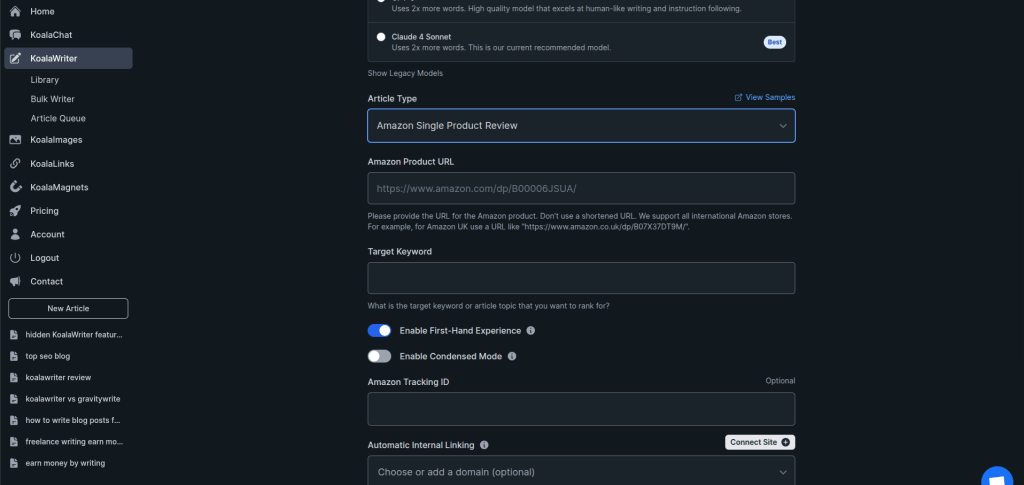
This one’s a game-changer for affiliate marketers. KoalaWriter pulls live product data straight from Amazon, letting you whip up affiliate content in a fraction of the usual time. The hidden feature streamlines affiliate marketing and takes a lot of grunt work off your plate.
The tool auto-generates product roundups with up-to-date pricing, specs, and customer ratings. Just enter your keywords and pick which products to feature.
Monetization perks:
- Live pricing keeps your info accurate
- Customer reviews add real-world trust
- SEO baked in to every article
- Bulk creation for multiple products at once
KoalaWriter grabs essential details—features, pros and cons, technical specs—and builds natural comparisons and buying guides. The AI-generated content looks polished and ready to go.
You can turn out a full product review in under 10 minutes. Expect clean comparison tables, bullet points for features, and natural CTAs.
Quick tips:
- Pick niche product categories for more targeted posts
- Tweak affiliate links to match your own program
- Add personal notes or experiences for credibility
- Include FAQs to boost engagement
The Amazon affiliate content creation feature works especially well for electronics, home goods, and fitness gear. The drafts usually need minimal tweaks, saving you time and hassle.
Feature 4: Outline Editor for Full Control

The outline editor puts you in the driver’s seat for blog structure. Add, delete, and reorder headings with drag-and-drop simplicity.
Plan your entire layout up front, so you skip tedious restructuring later. It’s a huge time-saver and keeps your articles organized from the start.
Key actions:
- Drag to reorder sections
- Indent to convert H2s to H3s (and vice versa)
- Delete with a click
- Add new sections instantly
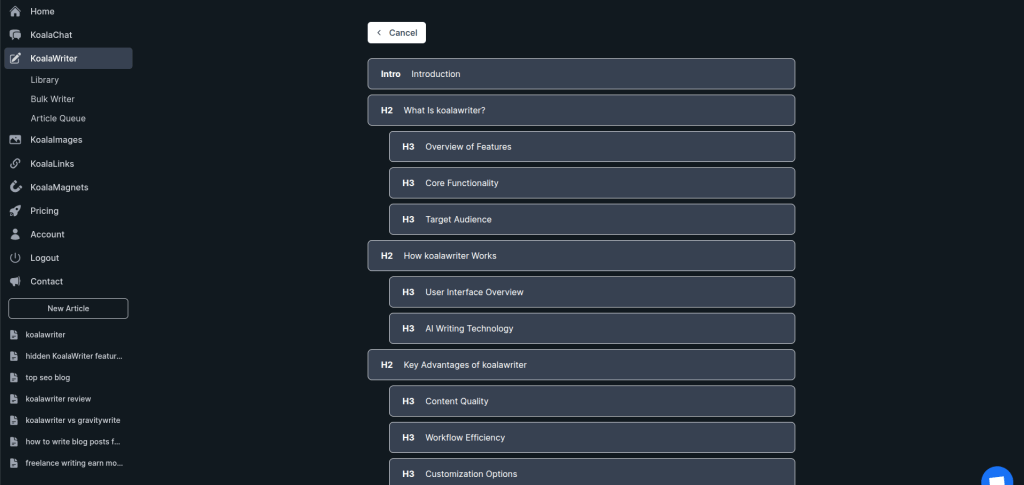
The outline editor helps organize ideas and improves readability. You get a bird’s-eye view of your blog, making it easier to spot gaps in content flow.
For SEO, it’s handy for creating a logical heading hierarchy. Search engines love well-organized content with clear breaks.
You can also attach prompts to each section, guiding KoalaWriter on exactly what to include in “Benefits” versus “How-to” areas.
The custom outline features let you paste your own outline or use KoalaWriter’s suggestions. Just hit the spacebar to indent H3s under their parent H2s.
This kind of control means your finished article matches your vision—no more hoping the AI gets it right.
Feature 5: Real-Time Data & Research

Most AI writers rely on stale training data. KoalaWriter flips the script by connecting to current web info.
The Real-Time Data feature fetches live information for each article section. Your content gets current stats, breaking news, and fresh insights—not yesterday’s headlines.
This is a lifesaver for trending topics or fast-moving industries. KoalaWriter automatically pulls the latest data, so you’re not stuck with outdated info.
Data Source Options
Pick from four research sources:
- Web: Uses top search results, great for most subjects
- Google Scholar: Ideal for health and academic writing
- Google News: Perfect for current events and trends
- Custom Search: Filter by specific sites if you want
Deep Research Enhancement
The Deep Research option goes further by digging deeper at every stage. It takes a bit longer, but the info quality jumps up noticeably.
Ready to get more from KoalaWriter? Explore these features and see how they can level up your content game. For more tips, check out the related guides linked throughout this article.
Practical Example
Let’s say you’re tackling a piece on social media marketing. KoalaWriter jumps in and pulls the latest platform stats, along with any recent algorithm tweaks.
Your article ends up grounded in what’s actually happening now, not outdated info from last year. That’s a relief, honestly.
The tool also automatically inserts external links to relevant sources. This boosts credibility and points readers to more details if they’re curious.
Curious about other ways to improve your writing workflow? Check out our guides on content automation and SEO tools for more tips.